Articles in this section
How to use the Buy Crypto?
Updated · 22 September 2026 · 11:56 AM
Buy Crypto allows users to quickly convert fiat into cryptocurrency. Follow our step-by-step instructions for a quick purchase.
- Go to https://tothemoon.com
- Click "Buy crypto" in the upper-left corner of the screen.
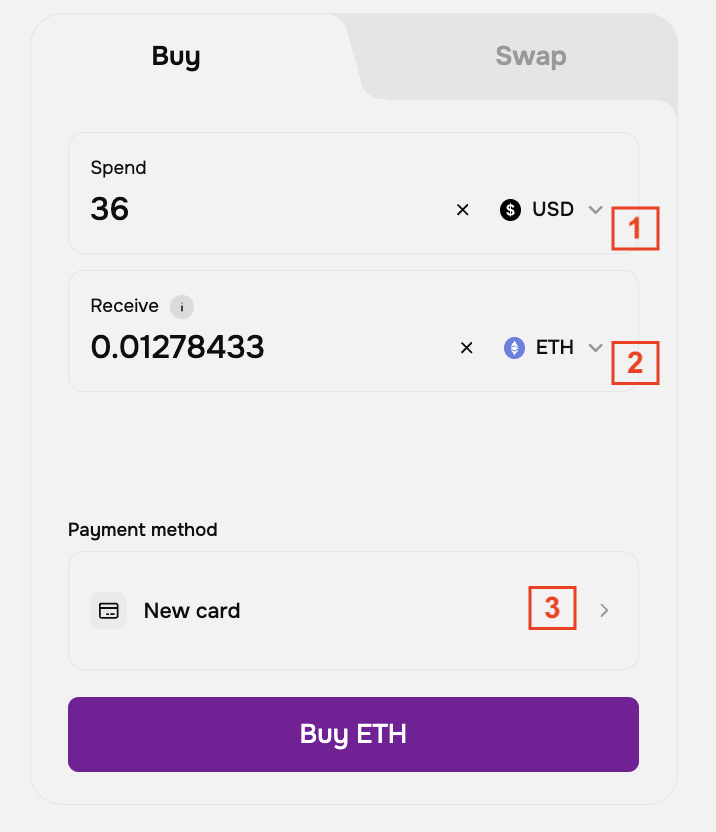
- Enter the amount in USD or EUR that you want to spend. Choose the cryptocurrency you want to receive. Once you choose, you will see the equivalent of the amount in cryptocurrency that you will receive. There are no hidden fees — the amount shown in the Receive field is the final amount you will receive.
- Choose the payment method, and click "Buy" to continue.
- You will be redirected to the payment system's website, where you need to enter bank card details and a confirmation code by SMS.
- Enter the code you received to finish the purchase, and that's it. Your Spot balance will be updated within a few seconds after the swap is completed. You can also view the transaction in the Transaction History
- You can make a withdrawal on the Balances page. Please use our instructions on How to make a crypto withdrawal.
If you need any assistance with your transactions, please contact our Support Team via the online chat or email us at support@tothemoon.com.